 4b1ca9bcc7
- Add --output-format json flag for structured Claude CLI responses
- Implement detect_response_format() for JSON vs text detection
- Implement parse_conversion_response() for extracting JSON fields
- Add check_claude_version() for modern CLI feature detection
- Enhance error handling with structured JSON error messages
- Improve file verification with JSON-derived status information
- Maintain backward compatibility with automatic text fallback
- Add 11 new TDD tests for modern CLI features (tests 23-33)
- Update README.md with Modern CLI Features section
- Update CLAUDE.md with v0.9.8 release notes

Test count: 276 (up from 265)
667 lines
23 KiB
Markdown
667 lines
23 KiB
Markdown
# Ralph for Claude Code
|
|
|
|

|
|

|
|

|
|

|
|
[](https://github.com/hesreallyhim/awesome-claude-code)
|
|
[](https://x.com/FrankBria18044)
|
|
|
|
> **Autonomous AI development loop with intelligent exit detection and rate limiting**
|
|
|
|
Ralph is an implementation of the Geoffrey Huntley's technique for Claude Code that enables continuous autonomous development cycles he named after [Ralph Wiggum](https://ghuntley.com/ralph/). It enables continuous autonomous development cycles where Claude Code iteratively improves your project until completion, with built-in safeguards to prevent infinite loops and API overuse.
|
|
|
|
**Install once, use everywhere** - Ralph becomes a global command available in any directory.
|
|
|
|
## Project Status
|
|
|
|
**Version**: v0.9.3 - Active Development
|
|
**Core Features**: Working and tested
|
|
**Test Coverage**: 165 tests, 100% pass rate
|
|
|
|
### What's Working Now
|
|
- Autonomous development loops with intelligent exit detection
|
|
- Rate limiting with hourly reset (100 calls/hour, configurable)
|
|
- Circuit breaker with advanced error detection (prevents runaway loops)
|
|
- Response analyzer with semantic understanding and two-stage error filtering
|
|
- **JSON output format support with automatic fallback to text parsing**
|
|
- **Session continuity with `--continue` flag for context preservation**
|
|
- **Modern CLI flags: `--output-format`, `--allowed-tools`, `--no-continue`**
|
|
- Multi-line error matching for accurate stuck loop detection
|
|
- 5-hour API limit handling with user prompts
|
|
- tmux integration for live monitoring
|
|
- PRD import functionality
|
|
- **CI/CD pipeline with GitHub Actions**
|
|
- 165 passing tests across 8 test files
|
|
|
|
### Recent Improvements
|
|
|
|
**v0.9.2 - Prompt File Fix**
|
|
- Fixed critical bug: replaced non-existent `--prompt-file` CLI flag with `-p` flag
|
|
- Modern CLI mode now correctly passes prompt content via `-p "$(cat file)"`
|
|
- Added error handling for missing prompt files in `build_claude_command()`
|
|
- Added 6 new TDD tests for `build_claude_command` function
|
|
- Maintains shell injection safety through array-based command building
|
|
|
|
**v0.9.1 - Modern CLI Commands (Phase 1.1)**
|
|
- JSON output format support with `--output-format json` (default)
|
|
- Session continuity using `--continue` flag for cross-loop context
|
|
- Tool permissions via `--allowed-tools` flag
|
|
- Loop context injection with `build_loop_context()` function
|
|
- Backward-compatible: automatic fallback to text parsing
|
|
- 70 new tests: JSON parsing (20) + CLI modern (23) + CLI parsing (27)
|
|
- CI/CD pipeline with kcov coverage reporting
|
|
|
|
**v0.9.0 - Circuit Breaker Enhancements**
|
|
- Fixed multi-line error matching in stuck loop detection
|
|
- Eliminated JSON field false positives (e.g., `"is_error": false`)
|
|
- Added two-stage error filtering for accurate detection
|
|
- Comprehensive test suite: 22 new tests for error detection
|
|
- Fixed installation to include lib/ directory components
|
|
|
|
### In Progress
|
|
- Expanding test coverage
|
|
- Log rotation functionality
|
|
- Dry-run mode
|
|
- Configuration file support (.ralphrc)
|
|
- Metrics and analytics tracking
|
|
- Desktop notifications
|
|
- Git backup and rollback system
|
|
|
|
**Timeline to v1.0**: ~4 weeks | [Full roadmap](IMPLEMENTATION_PLAN.md) | **Contributions welcome!**
|
|
|
|
## Features
|
|
|
|
- **Autonomous Development Loop** - Continuously executes Claude Code with your project requirements
|
|
- **Intelligent Exit Detection** - Automatically stops when project objectives are complete
|
|
- **Rate Limiting** - Built-in API call management with hourly limits and countdown timers
|
|
- **5-Hour API Limit Handling** - Detects Claude's 5-hour usage limit and offers wait/exit options
|
|
- **Live Monitoring** - Real-time dashboard showing loop status, progress, and logs
|
|
- **Task Management** - Structured approach with prioritized task lists and progress tracking
|
|
- **Project Templates** - Quick setup for new projects with best-practice structure
|
|
- **Comprehensive Logging** - Detailed execution logs with timestamps and status tracking
|
|
- **Configurable Timeouts** - Set execution timeout for Claude Code operations (1-120 minutes)
|
|
- **Verbose Progress Mode** - Optional detailed progress updates during execution
|
|
- **Response Analyzer** - AI-powered analysis of Claude Code responses with semantic understanding
|
|
- **Circuit Breaker** - Advanced error detection with two-stage filtering, multi-line error matching, and automatic recovery
|
|
- **CI/CD Integration** - GitHub Actions workflow with automated testing
|
|
|
|
## Quick Start
|
|
|
|
Ralph has two phases: **one-time installation** and **per-project setup**.
|
|
|
|
```
|
|
INSTALL ONCE USE MANY TIMES
|
|
+-----------------+ +----------------------+
|
|
| ./install.sh | -> | ralph-setup project1 |
|
|
| | | ralph-setup project2 |
|
|
| Adds global | | ralph-setup project3 |
|
|
| commands | | ... |
|
|
+-----------------+ +----------------------+
|
|
```
|
|
|
|
### Phase 1: Install Ralph (One Time Only)
|
|
|
|
Install Ralph globally on your system:
|
|
|
|
```bash
|
|
git clone https://github.com/frankbria/ralph-claude-code.git
|
|
cd ralph-claude-code
|
|
./install.sh
|
|
```
|
|
|
|
This adds `ralph`, `ralph-monitor`, and `ralph-setup` commands to your PATH.
|
|
|
|
> **Note**: You only need to do this once per system. After installation, you can delete the cloned repository if desired.
|
|
|
|
### Phase 2: Initialize New Projects (Per Project)
|
|
|
|
For each new project you want Ralph to work on:
|
|
|
|
#### Option A: Import Existing PRD/Specifications
|
|
```bash
|
|
# Convert existing PRD/specs to Ralph format (recommended)
|
|
ralph-import my-requirements.md my-project
|
|
cd my-project
|
|
|
|
# Review and adjust the generated files:
|
|
# - PROMPT.md (Ralph instructions)
|
|
# - @fix_plan.md (task priorities)
|
|
# - specs/requirements.md (technical specs)
|
|
|
|
# Start autonomous development
|
|
ralph --monitor
|
|
```
|
|
|
|
#### Option B: Manual Project Setup
|
|
```bash
|
|
# Create blank Ralph project
|
|
ralph-setup my-awesome-project
|
|
cd my-awesome-project
|
|
|
|
# Configure your project requirements manually
|
|
# Edit PROMPT.md with your project goals
|
|
# Edit specs/ with detailed specifications
|
|
# Edit @fix_plan.md with initial priorities
|
|
|
|
# Start autonomous development
|
|
ralph --monitor
|
|
```
|
|
|
|
### Ongoing Usage (After Setup)
|
|
|
|
Once Ralph is installed and your project is initialized:
|
|
|
|
```bash
|
|
# Navigate to any Ralph project and run:
|
|
ralph --monitor # Integrated tmux monitoring (recommended)
|
|
|
|
# Or use separate terminals:
|
|
ralph # Terminal 1: Ralph loop
|
|
ralph-monitor # Terminal 2: Live monitor dashboard
|
|
```
|
|
|
|
## How It Works
|
|
|
|
Ralph operates on a simple but powerful cycle:
|
|
|
|
1. **Read Instructions** - Loads `PROMPT.md` with your project requirements
|
|
2. **Execute Claude Code** - Runs Claude Code with current context and priorities
|
|
3. **Track Progress** - Updates task lists and logs execution results
|
|
4. **Evaluate Completion** - Checks for exit conditions and project completion signals
|
|
5. **Repeat** - Continues until project is complete or limits are reached
|
|
|
|
### Intelligent Exit Detection
|
|
|
|
Ralph automatically stops when it detects:
|
|
- All tasks in `@fix_plan.md` marked complete
|
|
- Multiple consecutive "done" signals from Claude Code
|
|
- Too many test-focused loops (indicating feature completeness)
|
|
- Strong completion indicators in responses
|
|
- Claude API 5-hour usage limit reached (with user prompt to wait or exit)
|
|
|
|
## Importing Existing Requirements
|
|
|
|
Ralph can convert existing PRDs, specifications, or requirement documents into the proper Ralph format using Claude Code.
|
|
|
|
### Supported Formats
|
|
- **Markdown** (.md) - Product requirements, technical specs
|
|
- **Text files** (.txt) - Plain text requirements
|
|
- **JSON** (.json) - Structured requirement data
|
|
- **Word documents** (.docx) - Business requirements
|
|
- **PDFs** (.pdf) - Design documents, specifications
|
|
- **Any text-based format** - Ralph will intelligently parse the content
|
|
|
|
### Usage Examples
|
|
|
|
```bash
|
|
# Convert a markdown PRD
|
|
ralph-import product-requirements.md my-app
|
|
|
|
# Convert a text specification
|
|
ralph-import requirements.txt webapp
|
|
|
|
# Convert a JSON API spec
|
|
ralph-import api-spec.json backend-service
|
|
|
|
# Let Ralph auto-name the project from filename
|
|
ralph-import design-doc.pdf
|
|
```
|
|
|
|
### What Gets Generated
|
|
|
|
Ralph-import creates a complete project with:
|
|
|
|
- **PROMPT.md** - Converted into Ralph development instructions
|
|
- **@fix_plan.md** - Requirements broken down into prioritized tasks
|
|
- **specs/requirements.md** - Technical specifications extracted from your document
|
|
- **Standard Ralph structure** - All necessary directories and template files
|
|
|
|
The conversion is intelligent and preserves your original requirements while making them actionable for autonomous development.
|
|
|
|
### Modern CLI Features (v0.9.8)
|
|
|
|
Ralph-import uses modern Claude Code CLI features for improved reliability:
|
|
|
|
- **JSON Output Format**: Structured responses enable precise parsing of conversion results
|
|
- **Automatic Fallback**: Gracefully handles older CLI versions with text-based parsing
|
|
- **Enhanced Error Reporting**: Extracts specific error messages and codes from JSON responses
|
|
- **Session Tracking**: Captures session IDs for potential continuation of interrupted conversions
|
|
|
|
> **Note**: These features require Claude Code CLI version 2.0.76 or later. Older versions will work with standard text output.
|
|
|
|
## Configuration
|
|
|
|
### Rate Limiting & Circuit Breaker
|
|
|
|
Ralph includes intelligent rate limiting and circuit breaker functionality:
|
|
|
|
```bash
|
|
# Default: 100 calls per hour
|
|
ralph --calls 50
|
|
|
|
# With integrated monitoring
|
|
ralph --monitor --calls 50
|
|
|
|
# Check current usage
|
|
ralph --status
|
|
```
|
|
|
|
The circuit breaker automatically:
|
|
- Detects API errors and rate limit issues with advanced two-stage filtering
|
|
- Opens circuit after 3 loops with no progress or 5 loops with same errors
|
|
- Eliminates false positives from JSON fields containing "error"
|
|
- Accurately detects stuck loops with multi-line error matching
|
|
- Gradually recovers with half-open monitoring state
|
|
- Provides detailed error tracking and logging with state history
|
|
|
|
### Claude API 5-Hour Limit
|
|
|
|
When Claude's 5-hour usage limit is reached, Ralph:
|
|
1. Detects the limit error automatically
|
|
2. Prompts you to choose:
|
|
- **Option 1**: Wait 60 minutes for the limit to reset (with countdown timer)
|
|
- **Option 2**: Exit gracefully (or auto-exits after 30-second timeout)
|
|
3. Prevents endless retry loops that waste time
|
|
|
|
### Custom Prompts
|
|
|
|
```bash
|
|
# Use custom prompt file
|
|
ralph --prompt my_custom_instructions.md
|
|
|
|
# With integrated monitoring
|
|
ralph --monitor --prompt my_custom_instructions.md
|
|
```
|
|
|
|
### Execution Timeouts
|
|
|
|
```bash
|
|
# Set Claude Code execution timeout (default: 15 minutes)
|
|
ralph --timeout 30 # 30-minute timeout for complex tasks
|
|
|
|
# With monitoring and custom timeout
|
|
ralph --monitor --timeout 60 # 60-minute timeout
|
|
|
|
# Short timeout for quick iterations
|
|
ralph --verbose --timeout 5 # 5-minute timeout with progress
|
|
```
|
|
|
|
### Verbose Mode
|
|
|
|
```bash
|
|
# Enable detailed progress updates during execution
|
|
ralph --verbose
|
|
|
|
# Combine with other options
|
|
ralph --monitor --verbose --timeout 30
|
|
```
|
|
|
|
### Exit Thresholds
|
|
|
|
Modify these variables in `~/.ralph/ralph_loop.sh`:
|
|
|
|
**Exit Detection Thresholds:**
|
|
```bash
|
|
MAX_CONSECUTIVE_TEST_LOOPS=3 # Exit after 3 test-only loops
|
|
MAX_CONSECUTIVE_DONE_SIGNALS=2 # Exit after 2 "done" signals
|
|
TEST_PERCENTAGE_THRESHOLD=30 # Flag if 30%+ loops are test-only
|
|
```
|
|
|
|
**Circuit Breaker Thresholds:**
|
|
```bash
|
|
CB_NO_PROGRESS_THRESHOLD=3 # Open circuit after 3 loops with no file changes
|
|
CB_SAME_ERROR_THRESHOLD=5 # Open circuit after 5 loops with repeated errors
|
|
CB_OUTPUT_DECLINE_THRESHOLD=70 # Open circuit if output declines by >70%
|
|
```
|
|
|
|
## Project Structure
|
|
|
|
Ralph creates a standardized structure for each project:
|
|
|
|
```
|
|
my-project/
|
|
├── PROMPT.md # Main development instructions for Ralph
|
|
├── @fix_plan.md # Prioritized task list (@ prefix = Ralph control file)
|
|
├── @AGENT.md # Build and run instructions
|
|
├── specs/ # Project specifications and requirements
|
|
│ └── stdlib/ # Standard library specifications
|
|
├── src/ # Source code implementation
|
|
├── examples/ # Usage examples and test cases
|
|
├── logs/ # Ralph execution logs
|
|
└── docs/generated/ # Auto-generated documentation
|
|
```
|
|
|
|
## Best Practices
|
|
|
|
### Writing Effective Prompts
|
|
|
|
1. **Be Specific** - Clear requirements lead to better results
|
|
2. **Prioritize** - Use `@fix_plan.md` to guide Ralph's focus
|
|
3. **Set Boundaries** - Define what's in/out of scope
|
|
4. **Include Examples** - Show expected inputs/outputs
|
|
|
|
### Project Specifications
|
|
|
|
- Place detailed requirements in `specs/`
|
|
- Use `@fix_plan.md` for prioritized task tracking
|
|
- Keep `@AGENT.md` updated with build instructions
|
|
- Document key decisions and architecture
|
|
|
|
### Monitoring Progress
|
|
|
|
- Use `ralph-monitor` for live status updates
|
|
- Check logs in `logs/` for detailed execution history
|
|
- Monitor `status.json` for programmatic access
|
|
- Watch for exit condition signals
|
|
|
|
## System Requirements
|
|
|
|
- **Bash 4.0+** - For script execution
|
|
- **Claude Code CLI** - `npm install -g @anthropic-ai/claude-code`
|
|
- **tmux** - Terminal multiplexer for integrated monitoring (recommended)
|
|
- **jq** - JSON processing for status tracking
|
|
- **Git** - Version control (projects are initialized as git repos)
|
|
- **Standard Unix tools** - grep, date, etc.
|
|
|
|
### Testing Requirements (Development)
|
|
|
|
If you want to run the test suite:
|
|
|
|
```bash
|
|
# Install BATS testing framework
|
|
npm install -g bats bats-support bats-assert
|
|
|
|
# Run all tests (165 tests)
|
|
npm test
|
|
|
|
# Run specific test suites
|
|
bats tests/unit/test_rate_limiting.bats
|
|
bats tests/unit/test_exit_detection.bats
|
|
bats tests/unit/test_json_parsing.bats
|
|
bats tests/unit/test_cli_modern.bats
|
|
bats tests/unit/test_cli_parsing.bats
|
|
bats tests/integration/test_loop_execution.bats
|
|
|
|
# Run error detection and circuit breaker tests
|
|
./tests/test_error_detection.sh
|
|
./tests/test_stuck_loop_detection.sh
|
|
```
|
|
|
|
Current test status:
|
|
- **165 tests** across 8 test files
|
|
- **100% pass rate** (165/165 passing)
|
|
- Comprehensive unit and integration tests
|
|
- Specialized tests for JSON parsing, CLI flags, circuit breaker, and installation workflows
|
|
|
|
> **Note on Coverage**: Bash code coverage measurement with kcov has fundamental limitations when tracing subprocess executions. Test pass rate (100%) is the quality gate. See [bats-core#15](https://github.com/bats-core/bats-core/issues/15) for details.
|
|
|
|
### Installing tmux
|
|
|
|
```bash
|
|
# Ubuntu/Debian
|
|
sudo apt-get install tmux
|
|
|
|
# macOS
|
|
brew install tmux
|
|
|
|
# CentOS/RHEL
|
|
sudo yum install tmux
|
|
```
|
|
|
|
## Monitoring and Debugging
|
|
|
|
### Live Dashboard
|
|
|
|
```bash
|
|
# Integrated tmux monitoring (recommended)
|
|
ralph --monitor
|
|
|
|
# Manual monitoring in separate terminal
|
|
ralph-monitor
|
|
```
|
|
|
|
Shows real-time:
|
|
- Current loop count and status
|
|
- API calls used vs. limit
|
|
- Recent log entries
|
|
- Rate limit countdown
|
|
|
|
**tmux Controls:**
|
|
- `Ctrl+B` then `D` - Detach from session (keeps Ralph running)
|
|
- `Ctrl+B` then `←/→` - Switch between panes
|
|
- `tmux list-sessions` - View active sessions
|
|
- `tmux attach -t <session-name>` - Reattach to session
|
|
|
|
### Status Checking
|
|
|
|
```bash
|
|
# JSON status output
|
|
ralph --status
|
|
|
|
# Manual log inspection
|
|
tail -f logs/ralph.log
|
|
```
|
|
|
|
### Common Issues
|
|
|
|
- **Rate Limits** - Ralph automatically waits and displays countdown
|
|
- **5-Hour API Limit** - Ralph detects and prompts for user action (wait or exit)
|
|
- **Stuck Loops** - Check `@fix_plan.md` for unclear or conflicting tasks
|
|
- **Early Exit** - Review exit thresholds if Ralph stops too soon
|
|
- **Execution Timeouts** - Increase `--timeout` value for complex operations
|
|
- **Missing Dependencies** - Ensure Claude Code CLI and tmux are installed
|
|
- **tmux Session Lost** - Use `tmux list-sessions` and `tmux attach` to reconnect
|
|
|
|
## Contributing
|
|
|
|
Ralph is actively seeking contributors! We're working toward v1.0.0 with clear priorities and a detailed roadmap.
|
|
|
|
### Quick Start for Contributors
|
|
|
|
1. **Fork and Clone**
|
|
```bash
|
|
git clone https://github.com/YOUR_USERNAME/ralph-claude-code.git
|
|
cd ralph-claude-code
|
|
```
|
|
|
|
2. **Install Dependencies**
|
|
```bash
|
|
npm install -g bats bats-support bats-assert
|
|
./install.sh # Install Ralph globally for testing
|
|
```
|
|
|
|
3. **Run Tests**
|
|
```bash
|
|
npm test # Run all tests
|
|
npm run test:unit # Run unit tests only
|
|
npm run test:integration # Run integration tests only
|
|
```
|
|
|
|
### Priority Contribution Areas
|
|
|
|
**High Priority (Help Needed!)**
|
|
1. **Test Implementation** - We need more tests to reach comprehensive coverage
|
|
- See [IMPLEMENTATION_PLAN.md](IMPLEMENTATION_PLAN.md) for detailed test specifications
|
|
|
|
2. **Feature Development**
|
|
- Log rotation functionality
|
|
- Dry-run mode
|
|
- Config file support
|
|
- Metrics tracking
|
|
- Notifications
|
|
- Backup/rollback
|
|
|
|
3. **Documentation**
|
|
- TESTING.md guide
|
|
- CONTRIBUTING.md (expand this section)
|
|
- Usage tutorials and examples
|
|
- Troubleshooting guides
|
|
|
|
4. **Real-World Testing**
|
|
- Use Ralph on your projects
|
|
- Report bugs and edge cases
|
|
- Share your experience
|
|
|
|
### Development Guidelines
|
|
|
|
- **Tests Required**: All new features must include tests
|
|
- **Code Style**: Follow existing bash patterns and conventions
|
|
- **Documentation**: Update README and relevant docs for user-facing changes
|
|
- **Commit Messages**: Clear, descriptive commit messages
|
|
- **Branch Naming**: `feature/feature-name` or `fix/bug-description`
|
|
|
|
### Pull Request Process
|
|
|
|
1. Create a feature branch (`git checkout -b feature/amazing-feature`)
|
|
2. Make your changes with tests
|
|
3. Run full test suite: `npm test` (must pass 100%)
|
|
4. Update documentation if needed
|
|
5. Commit changes (`git commit -m 'Add amazing feature'`)
|
|
6. Push to your fork (`git push origin feature/amazing-feature`)
|
|
7. Open a Pull Request with:
|
|
- Clear description of changes
|
|
- Link to related issues
|
|
- Test results
|
|
- Screenshots (if UI/output changes)
|
|
|
|
### Development Roadmap Reference
|
|
|
|
See [IMPLEMENTATION_PLAN.md](IMPLEMENTATION_PLAN.md) for the complete roadmap including:
|
|
- Detailed test specifications
|
|
- Feature implementation guides
|
|
- Code examples for new functionality
|
|
- Success metrics and milestones
|
|
|
|
### Questions or Ideas?
|
|
|
|
- Open an issue for discussion
|
|
- Check existing issues for planned work
|
|
- Join discussions on pull requests
|
|
|
|
**Every contribution matters** - from fixing typos to implementing major features. Thank you for helping make Ralph better!
|
|
|
|
## License
|
|
|
|
This project is licensed under the MIT License - see the [LICENSE](LICENSE) file for details.
|
|
|
|
## Acknowledgments
|
|
|
|
- Inspired by the [Ralph technique](https://ghuntley.com/ralph/) created by Geoffrey Huntley
|
|
- Built for [Claude Code](https://claude.ai/code) by Anthropic
|
|
- Community feedback and contributions
|
|
|
|
## Related Projects
|
|
|
|
- [Claude Code](https://claude.ai/code) - The AI coding assistant that powers Ralph
|
|
- [Aider](https://github.com/paul-gauthier/aider) - Original Ralph technique implementation
|
|
|
|
---
|
|
|
|
## Command Reference
|
|
|
|
### Installation Commands (Run Once)
|
|
```bash
|
|
./install.sh # Install Ralph globally
|
|
./install.sh uninstall # Remove Ralph from system
|
|
./install.sh --help # Show installation help
|
|
```
|
|
|
|
### Ralph Loop Options
|
|
```bash
|
|
ralph [OPTIONS]
|
|
-h, --help Show help message
|
|
-c, --calls NUM Set max calls per hour (default: 100)
|
|
-p, --prompt FILE Set prompt file (default: PROMPT.md)
|
|
-s, --status Show current status and exit
|
|
-m, --monitor Start with tmux session and live monitor
|
|
-v, --verbose Show detailed progress updates during execution
|
|
-t, --timeout MIN Set Claude Code execution timeout in minutes (1-120, default: 15)
|
|
--output-format FORMAT Set output format: json (default) or text
|
|
--allowed-tools TOOLS Set allowed Claude tools (default: Write,Bash(git *),Read)
|
|
--no-continue Disable session continuity (start fresh each loop)
|
|
--reset-circuit Reset the circuit breaker
|
|
--circuit-status Show circuit breaker status
|
|
```
|
|
|
|
### Project Commands (Per Project)
|
|
```bash
|
|
ralph-setup project-name # Create new Ralph project
|
|
ralph-import prd.md project # Convert PRD/specs to Ralph project
|
|
ralph --monitor # Start with integrated monitoring
|
|
ralph --status # Check current loop status
|
|
ralph --verbose # Enable detailed progress updates
|
|
ralph --timeout 30 # Set 30-minute execution timeout
|
|
ralph --calls 50 # Limit to 50 API calls per hour
|
|
ralph-monitor # Manual monitoring dashboard
|
|
```
|
|
|
|
### tmux Session Management
|
|
```bash
|
|
tmux list-sessions # View active Ralph sessions
|
|
tmux attach -t <name> # Reattach to detached session
|
|
# Ctrl+B then D # Detach from session (keeps running)
|
|
```
|
|
|
|
---
|
|
|
|
## Development Roadmap
|
|
|
|
Ralph is under active development with a clear path to v1.0.0. See [IMPLEMENTATION_PLAN.md](IMPLEMENTATION_PLAN.md) for the complete roadmap.
|
|
|
|
### Current Status: v0.9.3
|
|
|
|
**What's Delivered:**
|
|
- Core loop functionality with intelligent exit detection
|
|
- Rate limiting (100 calls/hour) and circuit breaker pattern
|
|
- Response analyzer with semantic understanding
|
|
- 165 comprehensive tests (100% pass rate)
|
|
- tmux integration and live monitoring
|
|
- PRD import functionality
|
|
- Installation system and project templates
|
|
- Modern CLI commands with JSON output support
|
|
- CI/CD pipeline with GitHub Actions
|
|
- Comprehensive installation test suite
|
|
|
|
**Test Coverage Breakdown:**
|
|
- Unit Tests: 111 (CLI parsing, JSON, exit detection, rate limiting)
|
|
- Integration Tests: 54 (loop execution, edge cases, installation)
|
|
- Test Files: 8
|
|
|
|
### Path to v1.0.0 (~4 weeks)
|
|
|
|
**Enhanced Testing**
|
|
- Installation and setup workflow tests
|
|
- tmux integration tests
|
|
- Monitor dashboard tests
|
|
|
|
**Core Features**
|
|
- Log rotation functionality
|
|
- Dry-run mode
|
|
- Configuration file support - .ralphrc
|
|
|
|
**Advanced Features & Polish**
|
|
- Metrics and analytics tracking
|
|
- Desktop notifications
|
|
- Git backup and rollback system
|
|
- End-to-end tests
|
|
- Final documentation and release prep
|
|
|
|
See [IMPLEMENTATION_STATUS.md](IMPLEMENTATION_STATUS.md) for detailed progress tracking.
|
|
|
|
### How to Contribute
|
|
Ralph is seeking contributors! Priority areas:
|
|
1. **Test Implementation** - Help expand test coverage ([see plan](IMPLEMENTATION_PLAN.md))
|
|
2. **Feature Development** - Log rotation, dry-run mode, config files
|
|
3. **Documentation** - Usage examples, tutorials, troubleshooting guides
|
|
4. **Bug Reports** - Real-world usage feedback and edge cases
|
|
|
|
See [Contributing](#contributing) section above for guidelines.
|
|
|
|
---
|
|
|
|
**Ready to let AI build your project?** Start with `./install.sh` and let Ralph take it from there!
|
|
|
|
## Star History
|
|
|
|
[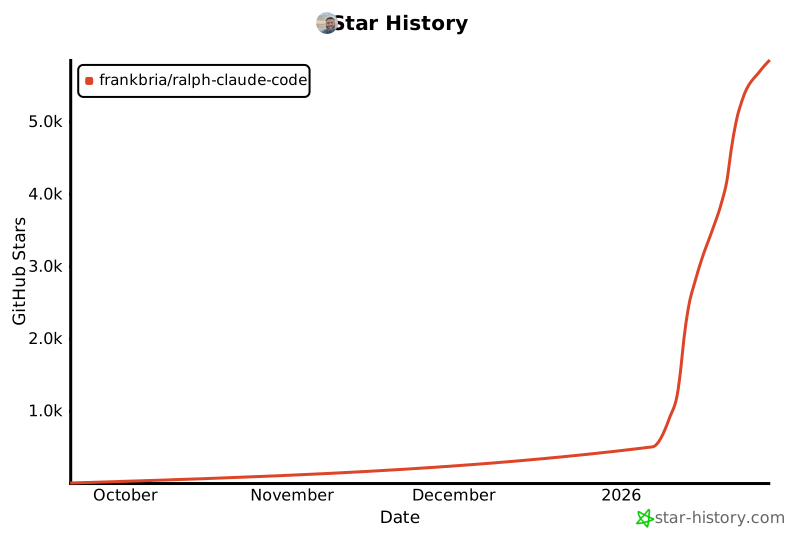](https://www.star-history.com/#frankbria/ralph-claude-code&type=date&legend=top-left)
|